AstraSync Setup
This wizard will guide you through the process of setting up AstraSync on your BlackBerry®
Setup Preparation
Before you start it is advised that you perform the following tasks:
- Backup your existing data using the BlackBerry® Desktop Manager
- Turn off desktop synchronization of your calendar, contacts or emails with BlackBerry Desktop Manager if you have enabled it. You may be synchronizing through a BlackBerry Enterprise Server (BES) account, via the BlackBerry Desktop Manager over a wire, or possibly through a 3rd party product which you have installed
- Disable Content Protection if you have enabled it. (Check this setting in Options | Security Options | General Settings.)
- Ensure you are in an area with good network coverage, either cellular or Wi-Fi.
- Know the following information during the setup; if you are unsure of any of these items ask your server administrator or hosting provider: (Click any item to get more information.)
 Your Email Address
Your full email address people use to send you messages.
Your Email User Name
This is normally the text before the @ sign in your email address.
If your email address is: my.name@work.com, your Email User Name is: my.name
Your Domain
This is normally the text after the @ sign in your email address.
If your email address is: my.name@work.com, your Domain is: work.com.
Sometimes the Domain is different to your email address as follows:
- Your best source for this information is your Mail Server Administrator or Hosting Provider.
- The login used to access webmail may contain the Domain. It is often in the format: Domain\username.
- Sometimes the domain may use part of the text that comes after the @ sign in users’ Email addresses, without the part after the '.'
e.g.: If your Email address is: my.name@work.com, your Domain may be work
- Sometimes the domain may use part of the text that comes after the @ sign in users’ Email addresses, with .local appended to it instead of .com.
e.g.: If your Email address is: my.name@work.com, your Domain may be work.local
- Sometimes AstraSync setup can be completed by leaving the Domain field blank.
Your Account Password
The password you use to access your email account.
Your Server Address
This is the external address of your Mail/ActiveSync server. AstraSync will attempt to work this out for you using AutoDiscover.
Information that may help you identify the ActiveSync Server Address:
- If you log into webmail at www.domain.com/owa, Your Server Address is probably www.domain.com.
- Ask your Mail Server Administrator or Hosting Provider: What is the address I would use to connect to the ActiveSync Server?

Configure AstraSync
Enter your account credentials.
If you are unsure of any of these items ask your server administrator or hosting
provider.
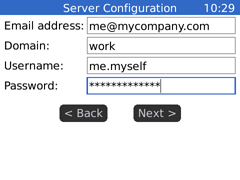 |
- Email address: Your email address.
- Domain: The domain part of your email account credentials. e.g. DOMAIN or
domain.com. More Information.
This is normally the text after the @ sign in your email address.
If your email address is: my.name@work.com, your Domain is: work.com.
Sometimes the Domain is different to your email address as follows:
- Your best source for this information is your Mail Server Administrator or Hosting
Provider.
- The login used to access webmail may contain the Domain. It is often in the format:
Domain\username.
- Sometimes the domain may use part of the text that comes after the @ sign in users’
Email addresses, without the part after the '.'
e.g.: If your Email address is: my.name@work.com, your Domain may be work
- Sometimes the domain may use part of the text that comes after the @ sign in users’
Email addresses, with .local appended to it instead of .com.
e.g.: If your Email address is: my.name@work.com, your Domain may be work.local
- Sometimes AstraSync setup can be completed by leaving the Domain field blank.
- Username: The user part of your email account credentials. e.g. firstname.lastname.
More Information.
This is normally the text before the @ sign in your email address.
If your email address is: my.name@work.com, your Email User Name is: my.name
- Password: The password you use to access your email account.
|
If AutoDiscover has not been implemented by your server administrator, or you cancel
the AutoDiscover process AstraSync will prompt you for your server details
If you are unsure of any of these items ask your server administrator or hosting
provider.
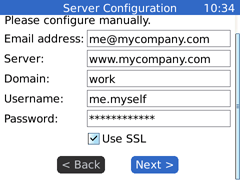 |
- Email address: Your email address.
- Server: The web address of your email server.
More Information.
This is the external address of your Mail/ActiveSync server.
Information that may help you identify the ActiveSync Server Address:
- If you log into webmail at www.domain.com/owa, Your Server Address is probably
www.domain.com.
- Ask your Mail Server Administrator or Hosting Provider: What is the address I would
use to connect to the ActiveSync Server?
- Domain: The domain part of your email account credentials. e.g. DOMAIN or
domain.com. More Information.
This is normally the text after the @ sign in your email address.
If your email address is: my.name@work.com, your Domain is: work.com.
Sometimes the Domain is different to your email address as follows:
- Your best source for this information is your Mail Server Administrator or Hosting
Provider.
- The login used to access webmail may contain the Domain. It is often in the format:
Domain\username.
- Sometimes the domain may use part of the text that comes after the @ sign in users’
Email addresses, without the part after the '.'
e.g.: If your Email address is: my.name@work.com, your Domain may be work
- Sometimes the domain may use part of the text that comes after the @ sign in users’
Email addresses, with .local appended to it instead of .com.
e.g.: If your Email address is: my.name@work.com, your Domain may be work.local
- Sometimes AstraSync setup can be completed by leaving the Domain field blank.
- Username: The user part of your email account credentials. e.g. firstname.lastname.
More Information.
This is normally the text before the @ sign in your email address.
If your email address is: my.name@work.com, your Email User Name is: my.name
- Password: The password you use to access your email account.
- Use SSL: Un-check this box if your server does not support secure connections.
If you are unsure, leave this box checked
|
Click next to verify your account credentials with your server.
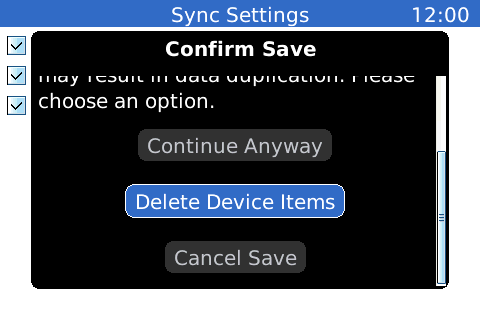
Confirm Save
Choose an action appropriate to your device.
If you have been synchronizing with your Exchange Account through the BlackBerry®
Desktop Manager you should choose to
“Delete Device Items”.
If you wish to upload all your Device Items to Exchange choose “Continue Anyway”
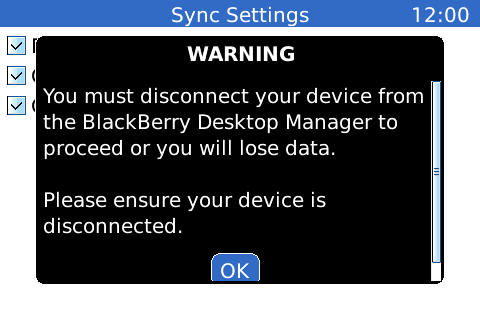
If you choose to delete the items on your device, you must disconnect from your
computer, type 'delete' in the conformation box, and wait while the items are deleted
Configuration Complete
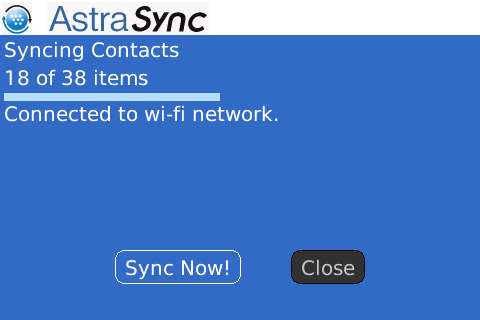
AstraSync should now process your configuration settings and perfrom an initial
sync of your data.
Once the sync has completed your email inbox will be displayed.
Next Steps
 We recommend that you also install our FREE sister product Monitor For BlackBerry from m.monitor4bb.com.
Monitor allows AstraSync to work at its most efficient, reducing battery and network usage. It also allows you to auto start the app when you power on your Blackberry. Find out more at www.Monitor4BB.com.
If AstraSync fails to synchronize correctly and displays an error message, please
follow the resolution steps for your error message at the AstraSync Forum